Plot tutorial
This page will guide you through your first script that makes a plot with VisuaLife
Choose your viewport: HTML or SVG?
Viewport is a class that is responsible for displaying your drawing. There are three viewports available:
- SvgViewport: writes your drawing or a plot into an
.svgfile on your computer; you have to provide the name of the output file- HtmlViewport: draws or makes a plot on a web page. You have to provide the
idstring of a web element, the graphics will be added to that element as SVG elements.- CanvasViewport: it also draws or makes a plot on a web page, but uses pixels rather than SVG. It can draw much more objects (eg. data points in your plot), but the content is not interactive
SvgViewport and HtmlViewport behave in the same manner. They share the same set of methods and produces graphics that looks exactly the same. You should make your drawing in SvgViewport first and once it works as you expect, copy & paste your Python code into a web page. Just remember to replace SvgViewport with HtmlViewport.
Simplest SvgViewport example
Let’s begin with a very simple example that produces an SVG file:
1 2 3 4 5 6 7 8 9 10 11 12 13 | import sys
sys.path.append('../../')
from visualife.core import SvgViewport
drawing = SvgViewport("simplest.svg", 500, 500,"white")
for i in range(16):
for j in range(16):
circle_id = "c-%d-%d" % (i, j)
drawing.circle(circle_id, i * 400 / 16.0 + 50, j * 400 / 16.0 + 50, 10, fill="pink")
drawing.close()
|
Simplest HtmlViewport example
Now the same example, but now as an HTML page:
1 2 3 4 5 6 7 8 9 10 11 12 13 14 15 16 17 18 19 20 21 22 23 24 25 26 27 28 | <html>
<head>
<script src="external_libs/brython.js"></script>
<script src="external_libs/brython_stdlib.js"></script>
<script src="visualife.brython.js"></script>
</head>
<body onload="brython()">
<script type="text/python">
from browser import document
from visualife.core import HtmlViewport
drawing = HtmlViewport(document['svg'], 500, 500,"white")
for i in range(16):
for j in range(16):
circle_id = "c-%d-%d" % (i, j)
drawing.circle(circle_id, i * 400 / 16.0 + 50, j * 400 / 16.0 + 50, 10, fill="pink")
drawing.close()
</script>
<svg id="svg" xmlns="http://www.w3.org/2000/svg" class="right" height="500" width="500"></svg>
</body>
</html>
|
As you can see there are few differences in this example comparing to the SvgViewport:
- HTML tags that create a page
- inlucing brython and visualife libraries in the <head> part
from browser import documentthat is a brython import which allows user to access webpage elements- importing and using HtmlViewport instead of SvgViewport
Simple plot in terminal - creating SVG
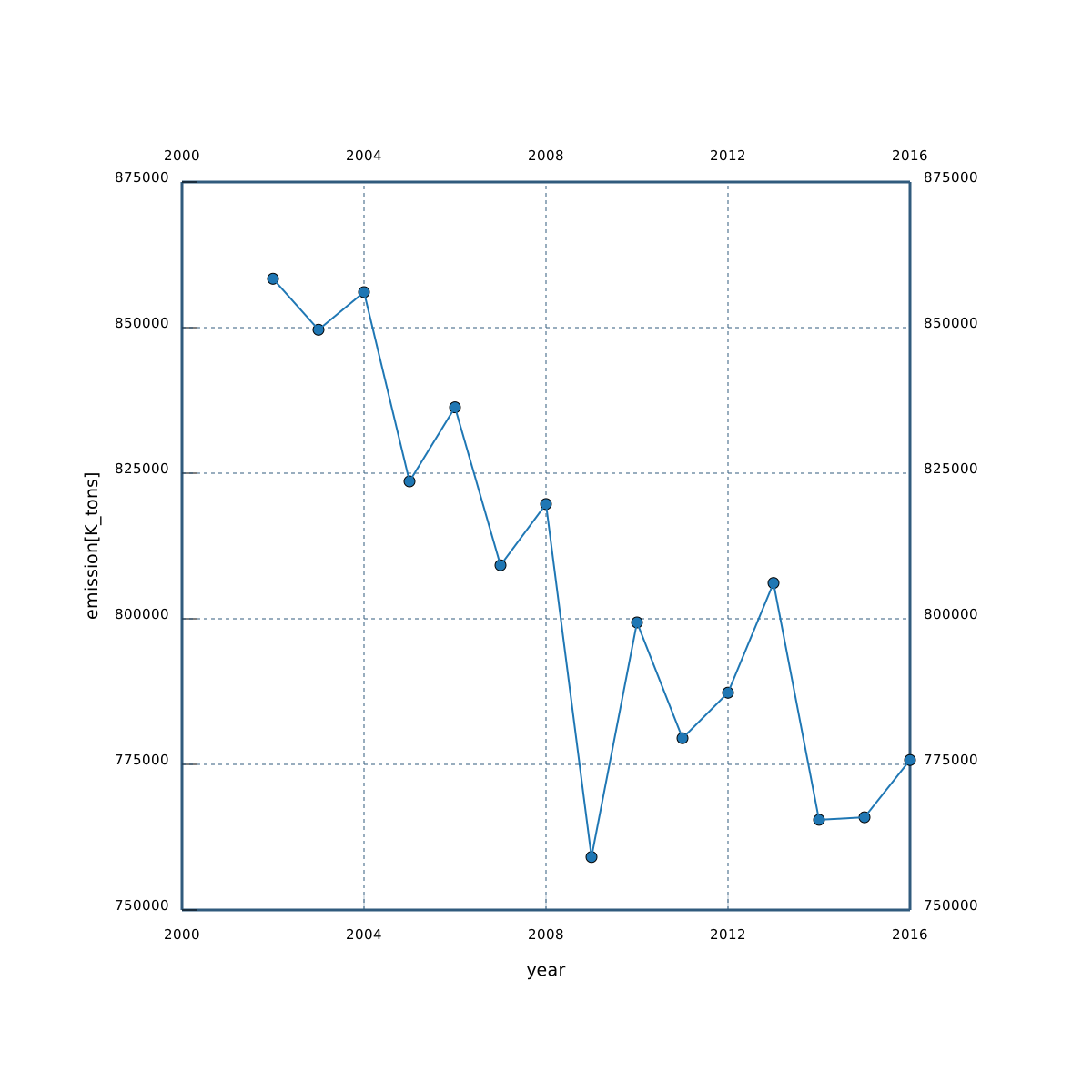
You can already make a simple drawing in both terminals so now it’s time for creating a plot. You can do it in SvgViewport using simple python script. Lets say you have a file co2emission.txt on your computer and it looks like this:
year	emission[K_tons]	emission_change[%]
2016	775752 				1.28
2015	765922 				0.06
2014	765489 				-5.04
2013	806144 				2.39
2012	787320 				1.00
2011	779506 				-2.49
2010	799376 				5.31
2009	759093 				-7.39
2008	819698 				1.30
2007	809186 				-3.24
2006	836310 				1.54
2005	823601 				-3.79
2004	856087 				0.76
2003	849643 				-1.02
2002	858391 				-1.67
To make a plot you will simply run:
python3 plot_from_file.py co2emission.txt
This command will make a plot from first column as X and second column as Y by default. If you want to make a plot from year (1st column) and emission_change(3rd column) you can run:
python3 plot_from_file.py co2emission.txt 1 3
Script also takes first row as axis labels. Below you can see how the script looks like:
1 2 3 4 5 6 7 8 9 10 11 12 13 14 15 16 17 18 19 20 21 22 23 24 25 26 27 28 29 30 31 32 33 34 35 36 37 38 39 40 41 42 43 | import sys
sys.path.append('../../')
from visualife.core import Plot, SvgViewport
from visualife.core.styles import make_darker
from random import random
if len(sys.argv) <2 :
print("USAGE: python3 plot_from_file.py ../inputs/phi_psi.results [1 2]")
exit()
filename = sys.argv[1]
col_x = 1
col_y = 2
if len(sys.argv)>2:
col_x = int(sys.argv[2])
col_y = int(sys.argv[3])
data_x =[]
data_y = []
with open(filename) as file:
data = file.readlines()
x_label = data[0].strip().split()[col_x-1]
y_label = data[0].strip().split()[col_y-1]
for line in data[1:]:
tokens = line.strip().split()
data_x.append(float(tokens[col_x-1]))
data_y.append(float(tokens[col_y-1]))
drawing = SvgViewport(filename.split(".")[0]+".svg",1200, 1200,"white")
pl = Plot(drawing,200,1000,200,1000,min(data_x)-1,max(data_x)+1,min(data_y)-1,max(data_y)+1,axes_definition="UBLR")
stroke_color = make_darker("SteelBlue", 0.3)
pl.axes["B"].label = x_label
pl.axes["L"].label = y_label
for key,ax in pl.axes.items() :
ax.fill, ax.stroke, ax.stroke_width = stroke_color, stroke_color, 3.0
ax.tics(0,5)
pl.scatter(data_x,data_y,markersize=6, markerstyle='c', title="serie-1",colors=0)
pl.line(data_x,data_y, colors=0)
pl.draw(grid=True)
drawing.close()
|
First twenty lines is responsible for loading a file and packing data into lists. Then from line 25th SvgViewport and Plot objects are created. Finally method Plot.scatter and Plot.line are called to draw both dots and line for this plot that will look like this:
How to make plots online?
Simple plot in a web-browser
Now we will do the same plot as in previous example but using HtmlViewport so it is going to be display in a browser on a HTML page. We will use brython in a <script> tag to make it work. One difference is that you need to have your file already in a script, because brython will not read file from your computer in the same way as python. Other differences were already discussed earlier in first part of these tutorial.
1 2 3 4 5 6 7 8 9 10 11 12 13 14 15 16 17 18 19 20 21 22 23 24 25 26 27 28 29 30 31 32 33 34 35 36 37 38 39 40 41 42 43 44 45 46 47 48 49 50 51 52 53 54 55 56 57 58 59 60 61 62 63 64 65 66 | <html>
<head>
<script src="brython.js"></script>
<script src="brython_stdlib.js"></script>
<script src="visualife.brython.js"></script>
</head>
<body onload="brython()">
<script type="text/python">
from browser import document
from visualife.core import Plot, HtmlViewport
from visualife.core.styles import make_darker
from random import random
file = """year emission[K_tons] emission_change[%]
2016 775752 1.28
2015 765922 0.06
2014 765489 -5.04
2013 806144 2.39
2012 787320 1.00
2011 779506 -2.49
2010 799376 5.31
2009 759093 -7.39
2008 819698 1.30
2007 809186 -3.24
2006 836310 1.54
2005 823601 -3.79
2004 856087 0.76
2003 849643 -1.02
2002 858391 -1.67"""
data_x=[]
data_y=[]
data = file.split("\n")
x_label = data[0].strip().split()[0]
y_label = data[0].strip().split()[1]
for line in data[1:]:
tokens = line.strip().split()
data_x.append(float(tokens[0]))
data_y.append(float(tokens[1]))
drawing = HtmlViewport(document["svg"], 0, 0, 600, 600,"white")
pl = Plot(drawing,100,500,100,500,min(data_x)-1,max(data_x)+1,min(data_y)-1,max(data_y)+1,axes_definition="UBLR")
stroke_color = make_darker("SteelBlue", 0.3)
pl.axes["B"].label = x_label
pl.axes["L"].label = y_label
for key,ax in pl.axes.items() :
ax.fill, ax.stroke, ax.stroke_width = stroke_color, stroke_color, 3.0
ax.tics(0,5)
pl.scatter(data_x,data_y,markersize=3, markerstyle='c', title="serie-1",colors=0)
pl.line(data_x,data_y, colors=0)
pl.draw(grid=True)
drawing.close()
</script>
<svg id="svg" xmlns="http://www.w3.org/2000/svg" class="right" height="600" width="600"></svg>
</body>
</html>
|
The plot will look exactly the same.
Online plot from REST data
Sometimes there is a need to download data from the Internet. We created ../api/visualife.widget.AjaxSender to make it easier for VisuaLife users to download data. Using this class you can send POST or GET requestes and use recived data eg. for plotting. There is also a python library json that can code and decode JSON format that is used in this requestes. In this example JSON looks like this
In lines no. 38 (script below) the AjaxSender object is constructed. In the next line call operator is used to send a request. After reciving the respons method on_complete will be called. json.loads() change string variable to python object eg. list or dictionary. Then you can get your data and plot them as in the previous example.
1 2 3 4 5 6 7 8 9 10 11 12 13 14 15 16 17 18 19 20 21 22 23 24 25 26 27 28 29 30 31 32 33 34 35 36 37 38 39 40 41 42 43 44 45 46 47 | <html>
<head>
<script src="brython.js"></script>
<script src="brython_stdlib.js"></script>
<script src="visualife.brython.js"></script>
</head>
<body onload="brython()">
<script type="text/python">
from browser import document
from visualife.core import Plot, HtmlViewport
from visualife.core.styles import make_darker
from visualife.widget import AjaxSender
from random import random
import json
def on_complete(evt):
data = json.loads(evt.text)
data_x,data_y=[],[]
for i in range(0,len(data)):
data_x.append(data[i]["x"])
data_y.append(data[i]["y"])
drawing = HtmlViewport(document["svg1"], 0, 0, 1200, 1200,"white")
pl = Plot(drawing,200,1000,200,1000,min(data_x)-1,max(data_x)+1,min(data_y)-1,max(data_y)+1,axes_definition="UBLR")
stroke_color = make_darker("SteelBlue", 0.3)
for key,ax in pl.axes.items() :
ax.fill, ax.stroke, ax.stroke_width = stroke_color, stroke_color, 3.0
ax.tics(0,5)
pl.scatter(data_x,data_y,markersize=6, markerstyle='c', title="serie-0",colors=1)
pl.draw(grid=True)
drawing.close()
link = "https://raw.githubusercontent.com/sgreben/jp/master/examples/mvrnorm.json"
a= AjaxSender(link,on_complete,"GET")
a()
</script>
<svg id="svg1" xmlns="http://www.w3.org/2000/svg" class="right" height="500" width="500"></svg>
</body>
</html>
|
Let’s make it interactive!
This is the last and probably the most interesting part in this tutorial. You are now going to add interactivity to your plot using only Python(Brython exactly)! It is very simple. All the points are in the SVG tag with id serie-1. To select these points you need to select this tag by id and take its children elements (line no. 42). Then iterate over all points and bind a function that will be called on event (line no. 44). All the events can be found here. Function needs to take one argument - fired event.
Now when you put your mouse over the point you can see that it’s id appears on the screen!
1 2 3 4 5 6 7 8 9 10 11 12 13 14 15 16 17 18 19 20 21 22 23 24 25 26 27 28 29 30 31 32 33 34 35 36 37 38 39 40 41 42 43 44 45 46 47 48 49 50 51 52 53 54 55 56 57 58 59 60 | <html>
<head>
<script src="brython.js"></script>
<script src="brython_stdlib.js"></script>
<script src="visualife.brython.js"></script>
</head>
<body onload="brython()">
<script type="text/python">
from browser import document
from visualife.core import Plot, HtmlViewport
from visualife.core.styles import make_darker
from visualife.widget import AjaxSender,TooltipWidget
from random import random
import json
ttw = TooltipWidget("ttw1","container","",150,20)
def show_tooltip(evt):
ttw.tooltip_text = evt.target.id
ttw.show(evt.clientX, evt.clientY)
def on_complete(evt):
data = json.loads(evt.text)
data_x,data_y=[],[]
for i in range(0,len(data),4):
data_x.append(data[i]["x"])
data_y.append(data[i]["y"])
drawing = HtmlViewport(document["svg2"], 0, 0, 1200, 1200,"white")
pl = Plot(drawing,200,1000,200,1000,min(data_x)-1,max(data_x)+1,min(data_y)-1,max(data_y)+1,axes_definition="UBLR")
stroke_color = make_darker("SteelBlue", 0.3)
for key,ax in pl.axes.items() :
ax.fill, ax.stroke, ax.stroke_width = stroke_color, stroke_color, 3.0
ax.tics(0,5)
pl.scatter(data_x,data_y,markersize=6, markerstyle='c', title="serie-1",colors=1)
pl.draw(grid=True)
drawing.close()
points = document["serie-1"].children
for p in points:
p.bind("mouseover",show_tooltip)
p.bind("mouseout",ttw.hide)
link = "https://raw.githubusercontent.com/sgreben/jp/master/examples/mvrnorm.json"
a= AjaxSender(link,on_complete,"GET")
a()
</script>
<div id="container" style="width:500px"></div>
<div class="tooltip" id="tooltip"></div>
<svg id="svg2" xmlns="http://www.w3.org/2000/svg" class="right" height="500" width="500"></svg>
</body>
</html>
|